Introduction
Moon Miner is now available to play on the Adafruit Fruit Jam. It is a retro-styled arcade game reminiscent of the Lunar Lander arcade game from the 1980s. Your mission is to retrieve minerals from various moons around the solar system. It is a physics-based game, where you must navigate your rocket ship based on gravity and thrust to make a safe landing for retrieving minerals. Achieve a successful landing by reducing speed to near zero and keeping the lander upright on designated flat areas.
Features
- The game employs physics to maneuver based on gravity. The game takes into account each moon has different gravitational properties.
- A heads-up display shows mission flight data in real-time.
- Complete the mission of collecting gems and your best time to complete the mission is saved. Play again to beat your best time.
- There are several ways you can die. Make sure you land on a horizontal surface at a safe velocity (and watch out for volcanos).
- Use fuel locations when running low on fuel. Some locations can be revisited again for additional fuel.
- Four missions are included.
- Written entirely in CircuitPython for the Adafruit Fruit Jam.
Requirements
Moon Miner is a game written for the Adafruit Fruit Jam in CircuitPython. Here is what you will need to run the game:
- Adafruit Fruit Jam
- USB keyboard and/or USB controller
- HDMI monitor with cable
- External speaker (optional)
- USB type C cable (for copying files to the Fruit Jam
Setup
MoonMiner can run either standalone or within the Fruit Jam OS. Fruit Jam OS is a front end that allows you to run CircuitPython apps, play games and edit code on the Fruit Jam.
To run standalone:
- Install the latest version of CircuitPython for the Fruit Jam (at least version 10.0.3 or above) and Library bundle for Version 10.x
- Unzip the latest Moon Miner code from https://github.com/ZContent/MoonMiner/releases/latest to the root folder of your CircuitPython drive
If running under Fruit Jam OS:
- Install Fruit Jam OS if not installed yet
- Make a folder named “MoonMiner” or similar under the apps folder
- Unzip the Moon Miner code from https://github.com/ZContent/MoonMiner/releases/latest under the newly created folder
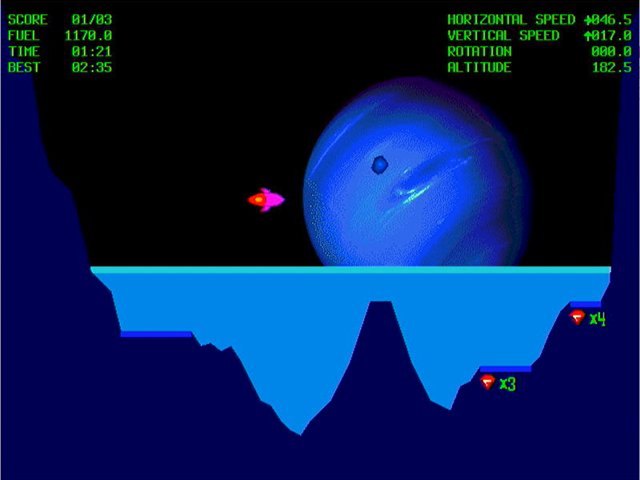
The Heads-Up Display
The game’s heads-up display provides real-time data on the mission’s flight. The display elements are:
- Score – The current and total mines visited in the mission.
- Fuel – For monitoring fuel usage. Green color is normal, yellow is low, and flashing red is very low
- Time – Current mission time
- Best – Best mission time. Can you beat your best time?
- Horizontal Speed – horizontal speed in meters per second, landings require low horizontal speed to avoid tip overs.
- Vertical Speed – vertical speed in meters per second, landings require low vertical speed.
- Rotation – rotation of lander in revolutions per minute (RPM), enabled if stabilizer is not working.
- Altitude – Distance to the moon surface, in meters
Thanks
Sound effects were made possible by the artists at FreeSound.org. Sounds used are:
- Rocket Rumble (rocket thrust) – LimitSnap_Creations
- Firecracker Explosion 3 (rocket exploding) – LukaCafuka
- Shiny Object of Value (take gems and fuel) – LilMati
- Beep (low fuel warning) – odilonmarcenaro